 TELO
Connect Apple Health to ChatGPT with Telo
Add Telo as a custom MCP server in ChatGPT, authorize it from your iPhone, and ask about the Apple Health data you’ve synced to Telo Health.
This guide connects your Telo data through a custom MCP server. OpenAI’s ChatGPT Health has its own Apple Health setup.
First, sync Apple Health data on your iPhone. Adding a custom MCP server on ChatGPT web requires an eligible Business or Enterprise/Edu workspace and permission to create the plugin. If the add option is missing, check ChatGPT’s plan and workspace requirements.
1. Add the Telo plugin
- Open ChatGPT Plugins and choose Add (+) → Add custom MCP server.
- Name it Telo, paste the server address below and select OAuth.
- Confirm the notice, choose Create as a plugin and open the Telo authorization page.
https://api.incubator.blynkai.app/v1/health/mcp
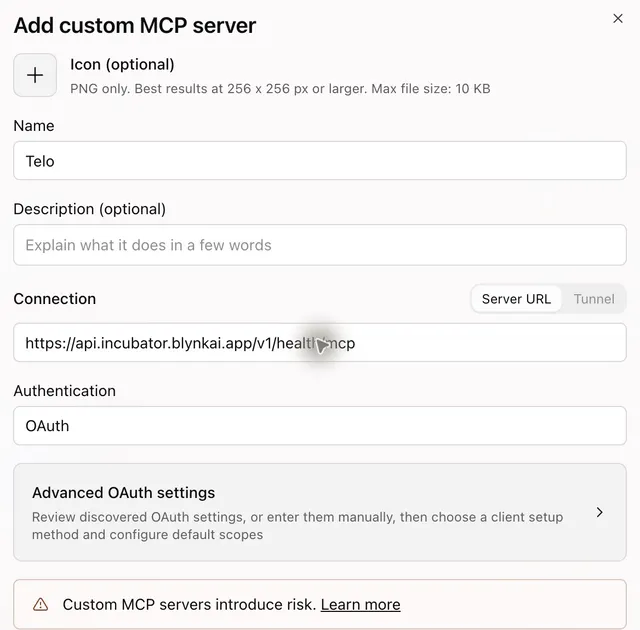
2. Pair your iPhone with OAuth
- On your iPhone, open Telo → Settings → AI Assistant Access and generate a pairing code.
- Enter the code on the Telo authorization page and approve access.
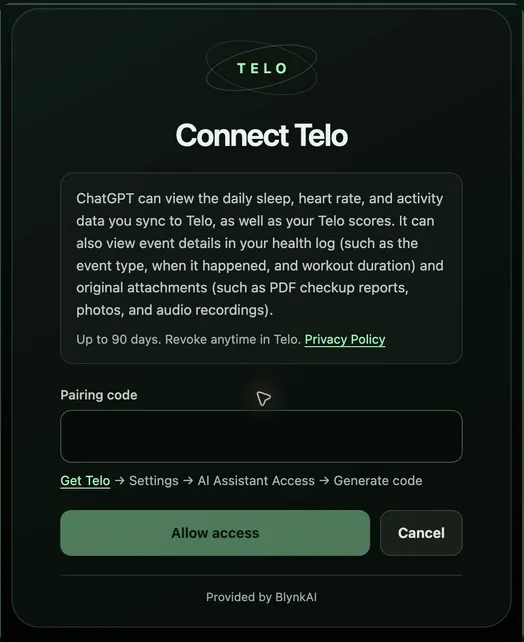
3. Ask a question
In ChatGPT, select Try in chat and ask a question.
Use Telo to list my sleep duration and workouts for the last three completed days. Mark any dates with no record.
Paired but can’t find a record?
Check that the record appears in Telo Health on the date you asked about. Then open Settings → AI Assistant Access and check that the connection is active. If your pairing code expires before you enter it, generate a new one in Telo and retry on the authorization page.
What Apple Health data can the assistant access?
Access is read-only. It can include synced daily summaries, such as sleep duration and stages, HRV, resting heart rate, active energy, exercise time, and Telo scores. Health Log access can include event times, categories, structured metrics, and links to available source attachments. Review the scope shown on the Telo authorization screen before approving.
How do I revoke access?
In Telo, open Settings → AI Assistant Access, select the connection, and revoke it. That connection can no longer read data from Telo. To manage conversations already shared with an assistant, use that platform’s controls.
Once you’re connected, try these Apple Health example questions.